Web Scraping API: The 2026 Guide to Automated Data
Master the web scraping API in 2026. Learn how APIs automate data collection, navigate legal considerations, and choose the right provider.

A web scraping API pulls data from webpages and hands it back in a clean, usable format—usually JSON, Markdown, or HTML. Rather than building and maintaining your own browser automation, proxy network, CAPTCHA handling, and parsing logic, you send a request and get structured data ready to work with.
Table of Contents
- Understanding What a Web Scraping API Solves
- Web Scraping API vs Traditional Methods
- Who Benefits Most
- Choosing the Right Provider
- Turn Web Pages Into Useful Context
- Extract Structured Business Data
- Track Prices and Product Availability
- Build Sales Prospect Lists
- Monitor Brands and Reviews
- Support SEO and Content Planning
- Aggregate Listings and Market Data
- Identify a Clear Purpose
- Check Permissions and Site Rules
- Protect and Review the Data
- Score the Provider Before Committing
- Provider Evaluation Checklist
- Managed vs. Self-Hosted: Where Each Fits
- The Non-Negotiable Check: Responsible Collection
- How Much Does a Web Scraping API Cost?
- Can It Handle Dynamic Content?
- How Fresh Is the Returned Data?
- Is Web Scraping Legal?
- Can It Connect to Existing Tools?
Understanding What a Web Scraping API Solves
Think of traditional web scraping like cooking a meal from scratch: you source the ingredients, prep everything, manage the mess, and plate it up. A web scraping API is closer to ordering from a prepared meal service. You tell the provider which page you want and what fields you need, and they handle the messy kitchen work behind the scenes.
A typical request might ask for:
- Product names, prices, ratings, and availability
- Article titles, authors, dates, and body text
- Company names, logos, colors, addresses, and social profiles
- Search results, links, screenshots, or sitemap entries
- Structured records for AI agents, CRM enrichment, or reporting
The response comes back as predictable data your application can store or analyze right away. Some providers also render content from JavaScript-heavy pages, pulling out information that only appears after a full browser loads all the scripts.
The real value isn't just extracting a page once. It's removing the infrastructure burden needed to extract pages over and over without things breaking.
Web Scraping API vs Traditional Methods
A scrappy Python script can be fine for a personal experiment. But when you need data at production volume, things get complicated fast. Websites change their markup without warning, throttle repeated requests, load content dynamically, and serve different versions depending on where you're connecting from.
| Approach | Setup Time | Maintenance | Scalability | Best For |
|---|---|---|---|---|
| Manual research | Immediate | Constant | Low | Occasional checks |
| Custom script | Moderate | High | Variable | Controlled projects |
| Web scraping API | Fast | Provider-managed | High | Recurring business workflows |
A good web scraping API handles rotating proxies, browser rendering, automatic retries, rate limiting, and CAPTCHA challenges behind the scenes. Many services also convert messy HTML into clean Markdown or schema-based JSON, which cuts down dramatically on the parsing code your team has to maintain.
Who Benefits Most
Founders can keep tabs on competitor pricing without spending hours refreshing product pages. Sales teams can enrich their CRM records automatically, while research teams can pull articles and reviews at scale for analysis. Developers get a single, reusable data layer instead of maintaining separate scrapers for every target site.
Say you're a content marketer covering your industry. You could pull the latest headlines and summaries from a dozen sources every morning, then feed the most relevant ones into your editorial workflow. Web data becomes a steady input rather than another manual chore.
Choosing the Right Provider
The right service still takes careful evaluation. Before you build a dependency, check what page types they support, what output formats are available, whether they cover your target geographies, and how their pricing and rate limits work. Pay attention to documentation quality, uptime history, and their stance on data permissions too. A few hours of due diligence here saves weeks of headaches later.
{
"title": "What Is a Web Scraping API? How It Works, Use Cases, and How to Choose One",
"content": "Imagine sending a single request and getting back perfectly structured data – product prices, headlines, real estate listings, whatever you need – without ever opening a browser or writing a line of parsing logic. That's essentially what a web scraping API does. It takes the messy, time-consuming work of extracting data from websites and wraps it behind a clean interface you can call from any script or application.\n\nAt its core, a web scraping API is a service that fetches web pages, extracts the data you're looking for, and returns it in a structured format like JSON or CSV. You hand it a URL, optionally pass along some parameters about what you want, and it gives you clean data back. No HTML wrangling on your end. No head-scratching over why a site's layout broke your parser overnight.\n\nThink of it this way: if traditional web scraping is like building your own car from scratch every time you need to drive somewhere, a web scraping API is calling an Uber. You say where you want to go, and someone else handles the engine, the traffic, and the parking.\n\n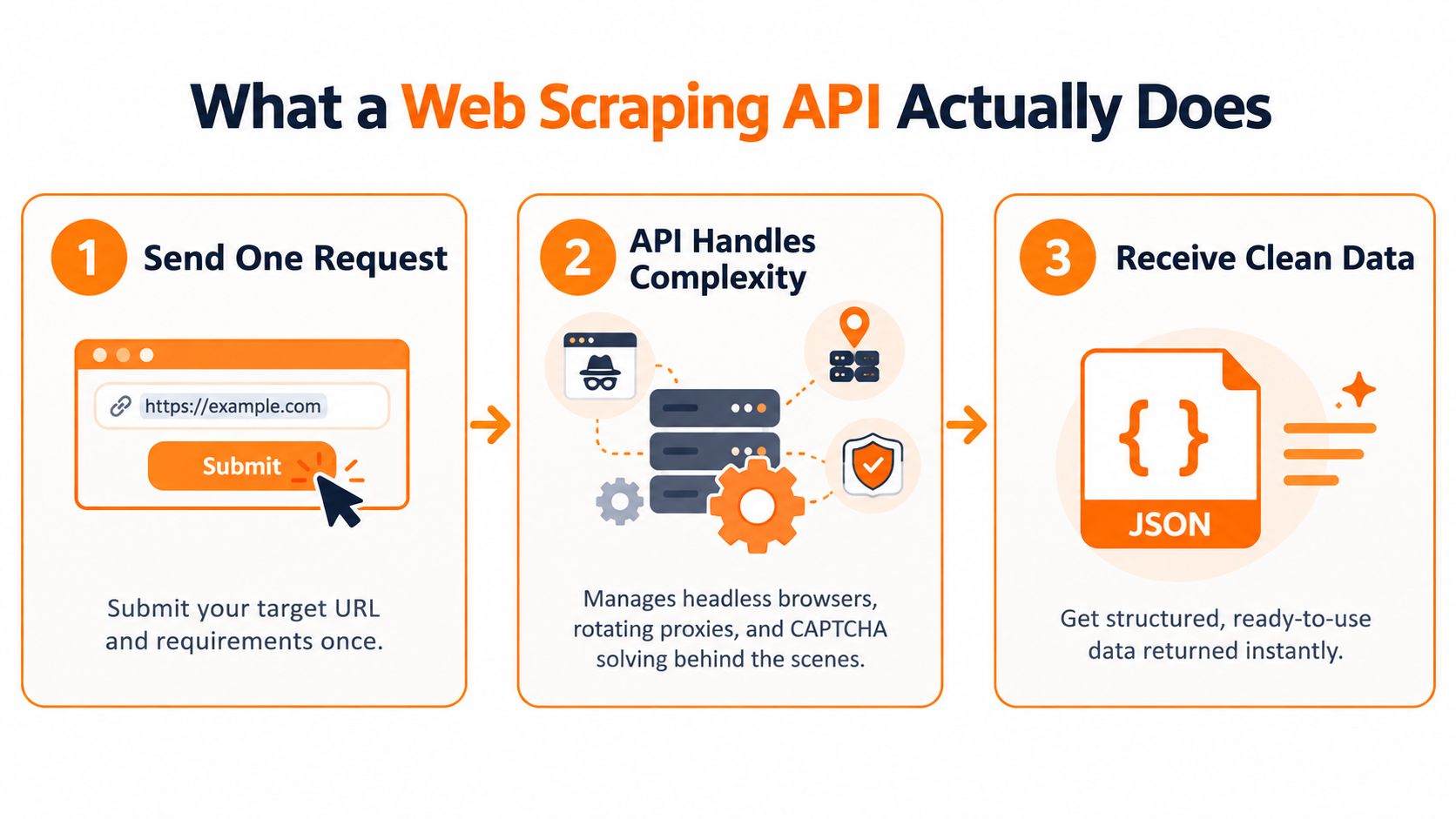 \n\nA typical request to a web scraping API looks something like this:\n\n\n{\n "url": "https://example.com/products\",\n "format": "json",\n "extract": ["title", "price", "availability"]\n}\n\n\nAnd the response comes back clean and ready to use:\n\n\n{\n "title": "Example Product",\n "price": "$49",\n "availability": "In stock",\n "status_code": 200\n}\n\n\nNo HTML parsing. No regex nightmares. Just the data.\n\n## Why Developers Are Moving Toward API-Based Scraping\n\nBuilding a scraper from scratch sounds straightforward until you hit the wall that every developer eventually runs into: anti-bot protections. Websites don't love being scraped. They deploy CAPTCHAs, rate limiting, browser fingerprinting, and dynamic JavaScript rendering specifically to block automated access.\n\n> "The real cost of web scraping isn't writing the code – it's maintaining it when the target site changes its layout, adds new defenses, or switches to client-side rendering."\n\nThat's the honest truth. The initial script might take an afternoon. But keeping it running reliably over weeks or months? That's where the real effort goes. A web scraping API absorbs all of that maintenance burden for you.\n\nHere's what changes when you switch to an API approach:\n\n* You stop worrying about proxy management and IP rotation\n* You no longer need to maintain headless browser infrastructure\n* Site layout changes are handled by the provider, not your team\n* You get structured data directly instead of raw HTML to parse\n* Scaling from 100 to 100,000 requests is a configuration change, not an architecture overhaul\n\nFor teams that need data reliably and at scale, the math almost always favors outsourcing the scraping infrastructure.\n\n## How a Web Scraping API Actually Works Under the Hood\n\nThe simplicity of a single API call masks a fair amount of complexity on the backend. Let's walk through what happens between your request and the response you receive.\n\nStep 1: Request Receipt and Routing. Your request hits the provider's infrastructure, where it gets queued and routed to an appropriate scraping engine. Some providers use a priority queue system where enterprise customers get dedicated capacity.\n\nStep 2: Browser or HTTP Fetch. Depending on the target site, the system decides whether a simple HTTP request will do or if it needs a full headless browser. Sites that render content with JavaScript – think React or Angular apps – require a headless browser like Puppeteer or Playwright to execute the JS and wait for the DOM to populate. Static sites? A plain HTTP fetch is faster and cheaper.\n\nStep 3: Anti-Bot Bypass. This is where the real engineering lives. The provider handles CAPTCHAs (often through third-party solving services or AI-based approaches), manages browser fingerprints, rotates user agents, and distributes requests across residential or datacenter proxies to avoid rate limits. IP rotation alone can involve pools of millions of addresses cycling based on target site, geography, and request frequency.\n\nStep 4: Data Extraction and Structuring. Once the page content is retrieved, the system extracts the requested data using CSS selectors, XPath expressions, or JavaScript snippets you've configured. The raw HTML gets transformed into the format you specified – JSON, CSV, XML, or sometimes even rendered screenshots.\n\nStep 5: Response Delivery. The structured data gets returned to your application, typically through a synchronous API response or an asynchronous callback (webhook) for longer-running jobs.\n\nThe whole pipeline usually completes in 2 to 15 seconds per request, though complex pages with heavy JavaScript can take longer.\n\n## The Key Components That Make It All Work\n\nUnderstanding the individual pieces helps you evaluate providers and troubleshoot issues when they arise. Here's a breakdown of what's running behind the scenes:\n\n| Component | Purpose | Example Use Case |\n| --- | --- | --- |\n| Proxy Rotation | Distributes requests across multiple IPs to avoid blocks and rate limits | Scraping thousands of product pages from an e-commerce site that limits requests per IP |\n| Headless Browser Engine | Renders JavaScript-heavy pages and waits for dynamic content to load | Extracting data from single-page applications built with React or Vue |\n| CAPTCHA Solver | Automatically handles CAPTCHA challenges using AI or human-in-the-loop services | Accessing sites that present Cloudflare or reCAPTCHA challenges on every request |\n| Parsing Engine | Extracts specific data points from HTML using selectors or custom logic | Pulling structured fields like title, price, and SKU from product pages |\n| Request Scheduler | Manages queue priority, concurrency, and rate limiting across accounts | Running 10,000 daily scraping jobs without overwhelming target sites or exceeding plan limits |\n| Data Formatter | Converts extracted content into the requested output format | Delivering clean JSON responses that plug directly into your database or application |\n\nEach of these components is a significant engineering effort on its own. A good web scraping API provider has spent years refining each one.\n\n## Common Use Cases Where Web Scraping APIs Shine\n\nThe range of applications is broader than most people expect. Here are the ones that come up most frequently:\n\nPrice Monitoring and Competitive Analysis. Retailers and e-commerce brands track competitor pricing across dozens or hundreds of products daily. A scraping API feeds pricing data into dashboards and automated repricing tools. One mid-size retailer we've worked with monitors over 50,000 SKUs across three competitor sites every six hours.\n\nLead Generation and Market Research. B2B companies scrape directory sites, review platforms, and social media to build prospect lists enriched with company details, contact info, and technographic data.\n\nSEO and Content Monitoring. Tracking SERP positions at scale, monitoring competitor content changes, and auditing large site structures all rely on automated data collection. Rather than manually checking rankings for thousands of keywords, a scraping API pulls the data and feeds it into your reporting pipeline.\n\nFinancial and Alternative Data. Hedge funds and fintech companies scrape news sites, regulatory filings, job boards, and review platforms to generate trading signals and market intelligence that isn't available through traditional data feeds.\n\nReal Estate and Travel Aggregation. Property listing sites and travel comparison platforms are classic scraping targets. APIs keep inventory and pricing data fresh across thousands of listings.\n\nThe common thread? These use cases all require reliable, repeated access to data at a scale that manual collection can't sustain.\n\n## Evaluating Web Scraping API Providers: What Actually Matters\n\nNot all scraping APIs are built the same. Some are essentially thin wrappers around open-source libraries, while others have invested heavily in infrastructure and anti-detection capabilities. Here's what to look for when comparing options:\n\n* Success rate transparency. Providers should publish their average success rates. Anything below 95% for standard sites should raise questions. Top providers consistently hit 98-99%.\n\n* Pricing model clarity. Watch out for providers that charge per request but don't clearly define what counts as a request. Failed requests, retries, and JavaScript rendering can all affect your bill. Prefer providers that charge only for successful extractions.\n\n* Geographic targeting. If you need data from specific countries or regions, the provider needs proxy coverage in those locations. This matters enormously for localized SERP scraping and regional pricing data.\n\n* Output format flexibility. JSON is standard, but you might also need CSV, XML, or even rendered PDFs and screenshots. Check what's available before committing.\n\n* Support for custom extraction logic. Pre-built templates are convenient, but real-world scraping often requires custom selectors or JavaScript snippets. Make sure the provider supports this.\n\n* Rate limits and concurrency. Understand the ceiling. If you need to process 1 million pages per day, a provider capped at 10 concurrent requests won't cut it.\n\nThe Quuu documentation walks through practical implementation patterns and integration approaches that illustrate many of these considerations in context.\n\n## Legal and Ethical Considerations You Can't Ignore\n\nHere's the uncomfortable truth that some providers gloss over: web scraping exists in a legal gray area that varies by jurisdiction, target site, and how you use the collected data.\n\nThe legal landscape shifted significantly with the hiQ Labs v. LinkedIn ruling in the U.S., which held that scraping publicly available data doesn't violate the Computer Fraud and Abuse Act. But that's far from the final word. The EU's GDPR adds another layer when personal data is involved, and terms of service violations can still expose you to breach of contract claims.\n\n> "Just because data is publicly visible in a browser doesn't automatically mean scraping it is legally risk-free. Context matters – what data, how it's used, and where both you and the target site are based."\n\nPractical guidelines to keep on the right side of things:\n\n* Respect
 robots.txt directives as a baseline, even if they're not legally binding everywhere\n* Don't scrape personal data without a lawful basis, especially under GDPR jurisdictions\n* Avoid overloading target servers – aggressive scraping that degrades site performance can attract legal action\n* Review the target site's terms of service before launching large-scale collection\n* When in doubt, especially for commercial use cases, consult a legal professional familiar with data and intellectual property law\n\nEthical scraping isn't just about avoiding lawsuits. It's about being a good citizen of the web. The same infrastructure that lets you collect data at scale can just as easily take a site offline if you're not careful with request rates.\n\n## Performance and Reliability Best Practices\n\nEven with a solid provider on your side, how you structure your scraping jobs matters. Poorly designed scraping workflows can burn through budget, trigger unnecessary blocks, and produce unreliable data.\n\nBatch requests strategically. If you're collecting data from thousands of URLs, batch them into reasonable chunks rather than flooding the API with concurrent requests. Most providers recommend starting with 5 to 20 concurrent requests and adjusting based on success rates.\n\nCache when possible. If you're scraping data that changes infrequently – say, a static product catalog – cache results locally and only re-scrape when you detect changes. This cuts costs dramatically and reduces load on target sites.\n\nHandle failures gracefully. Expect some requests to fail. Build retry logic with exponential backoff, and log failed requests so you can identify patterns. A sudden spike in failures for a specific domain usually means the target site changed its layout or added new protections.\n\nMonitor data quality over time. Set up automated checks that compare scraped data against expected schemas and value ranges. If a price field suddenly returns empty for 50% of products, you want to know before your downstream processes break.\n\nRotate parameters beyond just IPs. User agents, screen resolutions, timezones, and language headers all contribute to how "natural" your requests appear. Most good APIs handle this automatically, but it's worth confirming.\n\n## Troubleshooting Common Issues\n\nWhen things go wrong – and eventually they will – here are the most frequent culprits and how to address them:\n\nGetting blocked or receiving empty responses. This usually means the target site has flagged the requests. Try switching proxy types (residential instead of datacenter), reducing request frequency, or enabling full JavaScript rendering if you haven't already.\n\nMissing data fields. Sites change their HTML structure regularly. If your CSS selectors or extraction rules suddenly stop returning data, inspect the page source to see what changed. Most providers let you update extraction rules without changing your integration code.\n\nSlow response times. Complex pages with heavy JavaScript take longer to render. If speed is critical, check whether the provider offers a "fast mode" that skips JavaScript rendering for sites where static content is sufficient. Also verify that you're making requests from a geographic region close to the provider's scraping infrastructure.\n\nInconsistent data formats. Sometimes the same field returns different formats across pages – a price might show as "$49.00" on one page and "49" on another. Normalize data in your application layer rather than relying on the API to return perfectly uniform values.\n\n## Getting Started: From Zero to Your First Scraped Dataset\n\nThe barrier to entry is lower than you might think. Most providers offer a free tier or trial credits that let you test the workflow before committing. Here's a realistic path:\n\n1. Sign up and get your API key. This takes about two minutes. Store the key securely – treat it like a password.\n2. Make a test request. Start with a single, simple URL. Confirm you get structured data back in the format you expect.\n3. Scale up gradually. Move from one request to a small batch. Monitor success rates and response times as you increase volume.\n4. Integrate into your pipeline. Connect the API output to your database, analytics tool, or application. Set up error handling and monitoring from the start.\n5. Iterate on extraction rules. Refine your selectors and parameters based on real output quality. This is where most of the fine-tuning happens.\n\nThe whole process, from signup to production pipeline, can take as little as a day for straightforward use cases. More complex scenarios – scraping JavaScript-heavy sites with custom extraction logic – might take a week or two to dial in.\n\nAt its best, a web scraping API turns data collection from a maintenance headache into a reliable utility you can depend on. The key is choosing a provider whose infrastructure matches your needs and building your workflows with the same care you'd apply to any other integration in your stack."
}
Context.dev shows what happens when a modern web scraping API does more than just pull down a page. Through a single interface, you get real-time access to rendered HTML, clean Markdown, images, sitemaps, screenshots, and brand details. Worth a look if you're evaluating options — check out their web scraping api to see what's under the hood.
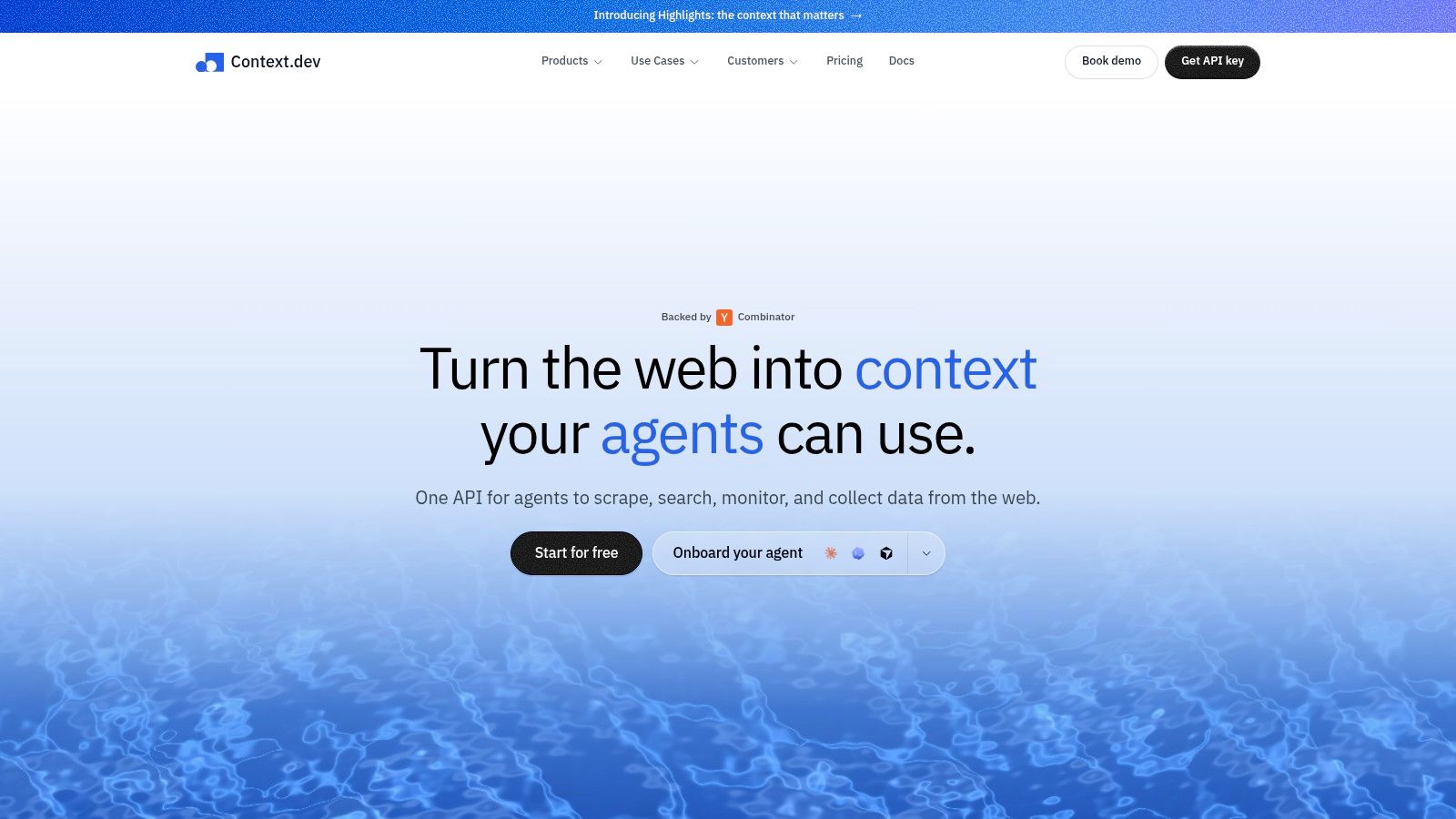
What stands out in the screenshot is how the platform serves up web context as ready-to-use building blocks instead of dumping raw HTML on you. That difference matters a lot when your application depends on clean, reliable inputs — whether that's for search, data enrichment, or feeding an AI pipeline.
Turn Web Pages Into Useful Context
Rather than stitching together a different tool for every job, teams can request what they actually need:
- LLM-ready Markdown for RAG pipelines and AI agents
- Rendered HTML and screenshots for visual audits or technical review
- Images, sitemaps, and links for site discovery and audits
- Brand metadata — logos, colors, fonts, social profiles, addresses
The service can also identify companies by domain, email, name, or stock ticker. Each lookup returns concise descriptions and NAICS classifications, which comes in handy for onboarding flows, personalization, and keeping CRM records current.
Extract Structured Business Data
When the standard page fields don't cut it, Context.dev's AI Query lets you pull custom entities and product data. There's also transaction identification, which connects vague merchant descriptions to recognizable brands — a practical touch for payment analytics.
On the developer side, SDKs for TypeScript, Python, and Ruby make setup straightforward. Caching with automatic quarterly refreshes works well for data that shifts slowly, and global CDN delivery speeds up logo retrieval. If your team leans more toward no-code, Zapier integrations keep things accessible without a heavy engineering lift.
The best fit isn't a one-off data pull — it's any workflow that needs fresh web context on a recurring basis.
Common use cases include giving AI agents live web access, enriching customer records, powering knowledge bases, and building on-brand product experiences. There's a free tier with credits available, so teams can test response quality and freshness before scaling up.

A web scraping API takes the grunt work out of daily online research and turns it into structured, usable business data. Rather than opening tabs and copy-pasting by hand, you send the URLs you care about and get back clean fields—prices, ratings, titles, stock status, company info—in whatever format your spreadsheet, dashboard, or CRM actually accepts.
Here's the simplest litmus test: if someone on your team checks the same pages every single day, an API can probably do that for them.
Track Prices and Product Availability
Retail and ecommerce teams use scraping APIs to keep tabs on competitor pages. The usual suspects are product names, current prices, active discounts, stock status, and delivery estimates. Run the requests on a schedule, pipe the results into a pricing dashboard, and you'll spot when a competitor quietly shifts their offer overnight.
Take a small electronics shop as an example. They might pull 200 competitor product pages each morning, cross-reference the results against their own catalog, and only flag the differences that actually matter. Nobody's manually copying prices anymore—the team just reviews the exceptions.
Build Sales Prospect Lists
Sales teams need company names, industries, locations, employee counts, and contact details from directories or public business websites. A scraping API collects those fields and feeds them into a review queue before anything hits the CRM.
One caveat worth calling out: just because information is publicly visible doesn't mean privacy obligations disappear. Stick to data that serves a legitimate business purpose, and don't treat a publicly listed phone number as blanket permission to cold-call.
Monitor Brands and Reviews
Brand managers can track mentions across news pages, review sites, and public community forums. Pulling titles, authors, dates, ratings, and review text into one place makes it far easier to spot recurring complaints or pick up on the kind of positive language customers actually use.
Fields worth collecting:
- Mention URL and publication date
- Sentiment or rating
- Product or service referenced
- Author name, where relevant
- Evidence excerpt for human review
Support SEO and Content Planning
SEO teams lean on scraping APIs to gather competitor headings, publication dates, featured topics, internal link structures, and search result details. That intel reveals content gaps and shifts in strategy before you'd notice them manually. And if you're handling industry research at scale, automated content curation can take a lot of the legwork out of finding relevant material. Check out this guide on automated content curation for a workflow worth studying.
Aggregate Listings and Market Data
Real estate, travel, and job platforms all run on listings that change constantly. An API can pull location, price, availability, features, and update timestamps, then refresh records on whatever cadence makes sense.
The smart move is to start small. Define the exact fields you need, test against a handful of pages where you have permission to scrape, validate the output carefully, and only then scale up the volume. Keeps costs under control and means a solo operator spends their time on decisions instead of data gathering.
A web scraping API can pull public information fast, but just because something's visible online doesn't mean you're free to grab it and do whatever you want with it. The real risk comes down to what you collect, why you need it, how you store it, and where the people or businesses behind that data are based.
In Europe, the European Data Protection Board has made it clear that GDPR can apply to scraping operations that handle personal data. Collecting, storing, organizing, and retrieving information all count as processing — even if the original page is wide open behind no login wall.

Identify a Clear Purpose
Before firing off a single request, get specific about why you're doing this. Vague goals like "improve competitor research" won't hold up under scrutiny. Something like "compare publicly listed product prices once daily" gives you a concrete boundary for what to collect and what to skip.
A solid starting checklist looks like this:
- Purpose: Spell out the decision or workflow the data supports.
- Fields: Grab only what's actually necessary for that purpose.
- People: Keep company-level details separate from anything identifying individuals.
- Timing: Log when each page was accessed.
- Retention: Decide upfront when records get deleted or refreshed.
This is the principle of data minimization in action. Say you're a retailer tracking competitor pricing. You need product name, price, currency, and availability — not a reviewer's full profile or their personal contact details.
Public data can still be personal data. Treat it according to what it contains and how you plan to use it, not just where you found it.
Check Permissions and Site Rules
Before you set up any recurring workflow, take a close look at the target website's terms of service, privacy notice, access controls, and robots.txt file. These won't settle every legal question on their own, but they tell you what the site owner expects and whether automated access is welcome or restricted.
Your API provider should be transparent about how they handle retries, traffic volume, regional routing, and blocked pages. Steer clear of workflows that bypass authentication, circumvent technical protections, or hammer a small site with unreasonable request loads.
Run a proportionate collection plan:
- Test on a small, limited sample first.
- Confirm that every requested field is genuinely needed.
- Set conservative request rates.
- Stop automatically when error rates or blocks start climbing.
- Keep a clear audit trail of sources and collection dates.
Protect and Review the Data
Compliance doesn't end when the data hits your storage. Encrypt what you've collected, restrict employee access, and don't dump sensitive information into logs or analytics dashboards. Build a deletion process for records that have outlived their original purpose.
For smaller or founder-led teams, a practical review comes down to a few honest questions:
| Question | Action |
|---|---|
| Does the dataset identify people? | Document the lawful basis and minimize fields |
| Is the source restricted? | Seek permission or choose another source |
| Will data be shared commercially? | Review licensing and contractual terms |
| Could the use harm someone? | Add human review and stricter limits |
If your project involves sensitive personal information, large-scale monitoring, or cross-border data processing, it's worth talking to a qualified privacy professional before pulling the trigger. Responsible collection protects the people behind the data, reduces your operational risk, and makes your entire scraping workflow far easier to justify if questions come up later.
Picking a web scraping API isn't really about chasing the lowest per-request price. It's about sidestepping the headaches that show up months down the road when your data pipeline starts buckling under scale. The smartest move? Run a small batch of your actual target pages through each candidate before signing anything. Include the messy ones — JavaScript-heavy listings, regional variants, and anything that updates by the hour.
Think of a managed service like renting a fully maintained delivery fleet. You're paying for the infrastructure, proxy rotation, browser rendering, automatic retries, and someone else's phone number to call when things break. Self-hosting, meanwhile, gives you total control but makes your team the mechanic for every single component.
Score the Provider Before Committing
Before you sign any contract, put each option through its paces. Send identical URLs across all candidates, then compare response time, data completeness, and formatting consistency. Repeat that test during peak traffic hours. What you're really calculating is the cost per successful record — not just the cost per request. A cheap service gets expensive fast if every failed attempt burns through your credits.
Here's where most teams get burned: rate limits and concurrency. A provider that looks affordable on paper can bleed your budget if failed retries count against your quota, or if your plan can't handle the volume your workflow demands. Ask upfront whether cached responses still consume credits, how long results stick around in their system, and whether batch jobs are supported.
Documentation tells you a lot about what implementation will actually feel like. You want working examples in your language of choice, straightforward auth instructions, webhook docs, and clear explanations of every error code. SDKs for Python, TypeScript, Ruby, or whatever your team uses can speed things up — but honestly, a rock-solid REST endpoint matters more than a flashy library list.
Then there's support. Fire a specific technical question at each candidate and see how fast and how well they respond. That reply will tell you more than any pricing page.
Provider Evaluation Checklist
Use something like this to score each option side by side. Weight each category based on what matters most for your use case, then rate every provider on a scale.
| Criteria | Weight | Provider A | Provider B | Provider C |
|---|---|---|---|---|
| Reliability (success rate, uptime, retries) | High | |||
| Proxy coverage (countries, types, rotation) | High | |||
| CAPTCHA handling (supported types, limits) | Medium | |||
| Pricing transparency (retries, rendering costs) | High | |||
| Support quality (docs, SDKs, response time) | Medium |
This kind of structured comparison keeps emotions out of the decision and surfaces real differences that marketing copy hides.
Managed vs. Self-Hosted: Where Each Fits
Self-hosting makes sense if you've got browser automation expertise on staff, predictable targets, and strict infrastructure or compliance requirements that demand you own every layer. But be honest about what that entails — you're signing up to maintain browser versions, proxy pools, parsers, monitoring systems, and your own compliance controls. Every one of those is a part-time job.
Managed APIs tend to fit founders, agencies, and lean marketing teams that need reliable collection without hiring a dedicated scraping engineer. The trade-off is less control; the upside is that you're focused on the data, not on keeping headless Chrome running at 3 AM.
For teams that turn scraped research into social content or other repurposed formats, this guide to speech-to-text API workflows can help connect raw web data to multi-channel publishing pipelines.
The Non-Negotiable Check: Responsible Collection
Before you commit to any provider, verify they support responsible collection practices. Look for controls around request pacing, geographic routing, data retention policies, and domain-level blocking. These aren't nice-to-haves — they protect you legally and keep your data pipeline running without sudden blackouts.
In the end, the right provider is the one that delivers predictable output, bills transparently, and picks up the phone when you need help. Start small, monitor quality and failure rates closely, and scale once you've got confidence in the numbers.
How Much Does a Web Scraping API Cost?
Pricing comes down to a few key factors: how many requests you make, whether you need JavaScript rendering, what kind of proxies you use, and whether you're grabbing raw HTML or asking for structured data. Getting a basic page is usually far cheaper than rendering JavaScript, solving CAPTCHAs, capturing screenshots, or extracting data into a clean JSON schema.
Before signing up, get clear on what counts as a billable request. Failed attempts, retries, cached responses, and browser sessions may each carry different charges, so look past the headline price and figure out the real cost per successful record.
Run a small batch of real URLs against the service first. That trial tells you a lot about response quality and what you'll actually spend each month — before you're locked in.
The cheapest API rarely saves you money if it returns half the data or forces you to retry everything three times over.
Can It Handle Dynamic Content?
It can — if the provider offers a headless browser or another JavaScript-rendering method. That matters whenever prices, product listings, comments, or search results only appear after scripts finish running.
A plain HTTP request might return an empty product container where the price should be. A browser-based approach, on the other hand, waits for the page to fully render and hands you the visible price. Check whether the service supports wait conditions, simulated clicks, scrolling, screenshots, and regional targeting if your use case needs any of that.
If the pages you're hitting are mostly static, skip browser rendering altogether. Lighter requests run faster and burn fewer credits.
How Fresh Is the Returned Data?
That depends on both your own settings and the provider's caching behavior. A cached response works fine for something like a company bio or a product spec — but not for stock levels or hourly pricing that shifts by the minute.
Match your refresh schedule to how quickly the source updates:
- Daily for evergreen articles and business profiles
- Hourly for pricing and inventory
- On demand for breaking news or live event data
Store a timestamp with every record. That way anyone downstream can decide whether the data is still useful or needs re-fetching.
Is Web Scraping Legal?
There's no simple yes or no answer. Legal risk depends on the source itself, the jurisdiction, terms of service, whether personal data is involved, how you collect it, and what you plan to do with it.
Read the site's rules, respect access controls, collect as little personal data as you can, keep your request rates reasonable, and document why you're scraping. GDPR may apply whenever personal data is being collected, stored, or organized. For commercial work or anything involving sensitive information, talk to a qualified lawyer before you proceed.
Can It Connect to Existing Tools?
Almost always. Most providers return JSON over REST, which plugs into databases, CRMs, spreadsheets, analytics platforms, and AI pipelines without much friction. Before going live, run through authentication, webhooks, pagination, error handling, and field consistency — the usual integration checkpoints.
Lock in stable schemas and validation rules, then wire the output into your workflow. For social and content teams, structured research data can also feed planning and publishing tools like Quuu. Pick one repeatable workflow to start, monitor the results, and only expand once the data proves reliable.