Speech to Text Api Guide for Content Teams
Master speech to text api solutions for content teams. Learn how voice recognition powers automation, compare accuracy metrics, and choose the right provider.
A speech-to-text API converts spoken audio into editable text through a service your applications and workflows can call directly. It takes interviews, podcasts, meetings, and voice notes and turns them into transcripts, captions, and social content — no manual typing required.
Table of Contents
- Turn Audio Into Usable Content
- From Sound Waves to Speech Patterns
- How Language Models Choose Words
- Streaming and Batch Processing
- Measure Errors With WER
- Track Latency and Usability
- Check Languages and Speakers
- Turn One Recording Into Several Assets
- Automate Captions and Accessibility
- Build a Voice-Led Social Workflow
- Choose the Right Processing Pattern
- Solve Everyday Transcription Problems
- Choose a Practical Starting Point
- Compare Real Costs
- Run a Controlled Pilot
- Ask Privacy Questions
- Can It Handle Accents and Dialects?
- What About Technical Jargon?
- Should You Use Streaming or Batch Processing?
Turn Audio Into Usable Content
Picture a speech-to-text API as a tireless digital note-taker. Your system sends it an audio file or live stream, and an automatic speech recognition model returns machine-readable text, often complete with timestamps, punctuation, confidence scores, and speaker labels. Deepgram explains how ASR APIs process audio through deep-learning models.
For content teams, the real win is speed. A Monday interview can become a searchable transcript, a blog draft, video subtitles, and several social posts before Tuesday even rolls around. Tools like Quuu can then help repurpose that content into scheduled posts for X, LinkedIn, Facebook, and Bluesky.
The best provider isn't necessarily the one with the cleanest demo. It's the one that performs reliably on your actual voices, recording conditions, languages, and terminology.
Before you start comparing vendors, it helps to separate the factors that affect transcript quality from those that affect workflow fit. Here's a breakdown of what to evaluate:
| Factor | Why It Matters | What to Look For |
|---|---|---|
| Accuracy | Errors in names, numbers, and product terms create editing work | Real-world tests, low Word Error Rate, custom vocabulary |
| Latency | Live captions and voice tools need quick responses | Streaming support and measured response times |
| Languages | Global audiences may require dialect and language coverage | Detection, multilingual audio, and translation options |
| Diarization | Interviews and meetings need clear speaker attribution | Reliable speaker labels and channel separation |
| Timestamps | Captions and searchable media depend on timing | Word- or segment-level timestamps |
| Privacy | Recordings may contain confidential conversations | Encryption, deletion controls, regional processing, and compliance |
| Pricing | Add-ons can change the real cost | Per-minute rates, minimums, storage fees, and usage limits |
Start with batch transcription when you're working with recorded podcasts, webinars, or interviews. Go for streaming transcription when you need live captions, voice agents, or real-time meeting displays. Then test a handful of providers using audio that actually represents your work — background noise, accents, interruptions, and all.
That small pilot will tell you far more than any polished feature page ever could. Compare the returned text, editing time, response speed, integration effort, and total estimated cost before you commit production audio to the workflow.
A speech-to-text API doesn't hear words the way people do. It receives sound waves, samples them into digital signals, and searches those signals for patterns that resemble spoken language. Think of it as turning a song into sheet music before guessing the lyrics.
The process typically starts when you upload a recording or send a live audio stream. The service cleans and segments the signal, then pulls out details like frequency, timing, pauses, and energy levels. These features help the model separate speech from music, silence, keyboard clicks, or background chatter.
The workflow below shows how content teams move from recorded audio to publishable text assets.
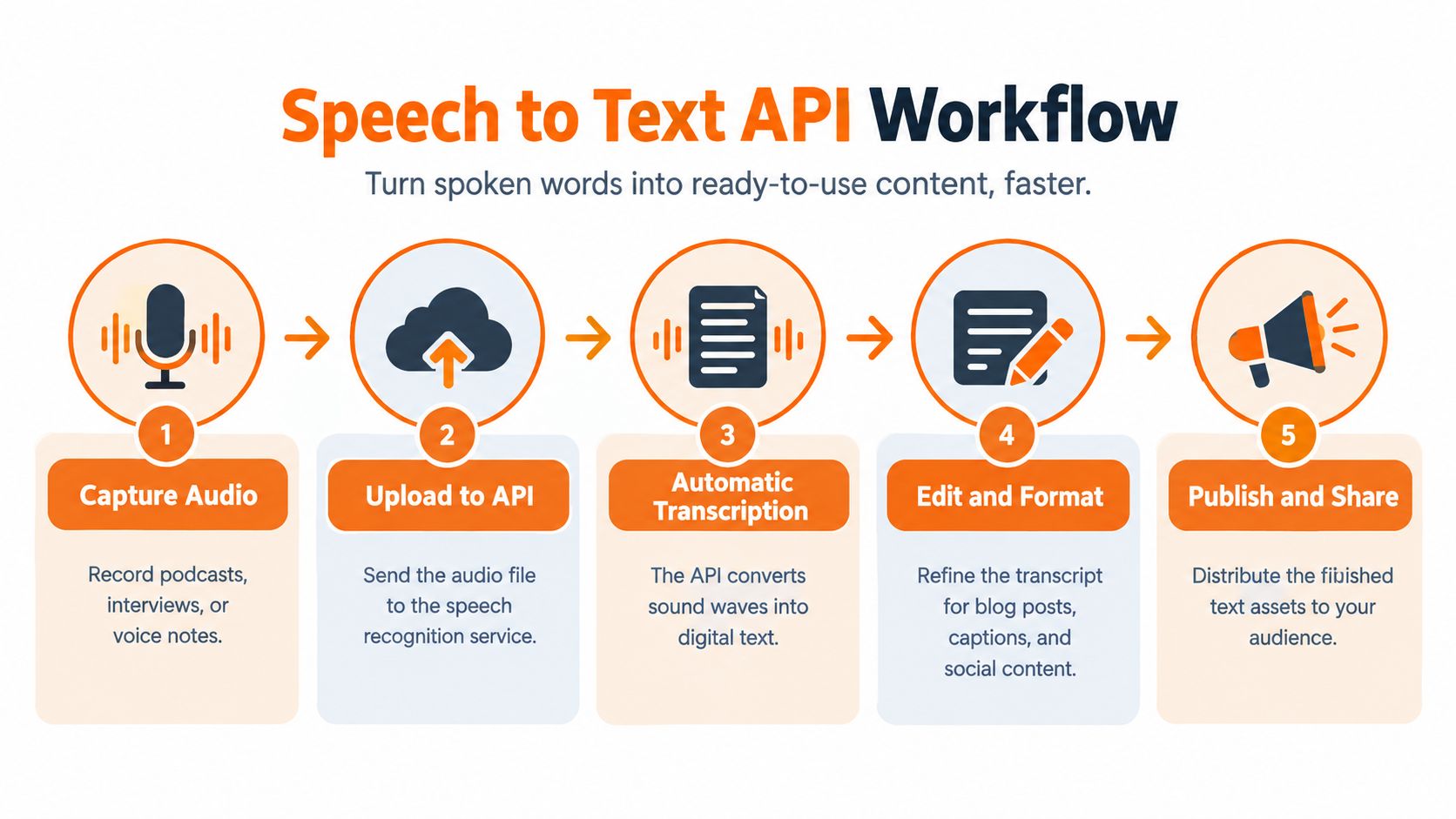
Here's the bigger picture: transcription isn't the end goal. Audio becomes text, text becomes edited content, and that content can then fuel captions, articles, or social posts.
From Sound Waves to Speech Patterns
The first major stage is feature extraction. The system breaks audio into tiny time windows and represents each one mathematically — similar to examining individual frames in a video. From there, it tracks how vocal patterns shift from one moment to the next.
Then an acoustic model steps in to compare those patterns against sounds it learned during training. It doesn't jump straight to deciding that a sound means "marketing" or "meeting." Instead, it estimates which phonemes — the smallest units of speech — are most likely present.
Background noise complicates things because it introduces competing signals. A quiet microphone gives the model a cleaner picture, while traffic, keyboard clicks, room echo, and overlapping voices force it to separate several patterns at once. Providers trained on messy, real-world recordings tend to handle these conditions far better than systems tested mostly on studio-quality audio.
A transcript is a prediction built from evidence, not a perfect recording of what the microphone captured.
How Language Models Choose Words
Once the system has estimated the sounds, a language model takes over to pick likely word sequences. If the audio could represent "send the file" or "send the trial," the surrounding words tip the scale toward whichever phrase makes more sense in context.
This works a lot like autocomplete, but across an entire sentence. Context can clean up unclear pronunciation — though it can also produce a confident mistake when the subject involves unusual names, acronyms, or technical vocabulary.
That's exactly why leading APIs offer custom vocabulary, phrase weighting, punctuation control, and formatting options. Feeding in product names or industry terms gives the model extra clues before transcription even begins.
Streaming and Batch Processing
A batch request processes a completed file and returns results once it's done. This fits podcasts, interviews, webinars, and archived meetings — situations where getting the full output matters more than getting it fast.
Streaming, on the other hand, sends small audio segments continuously and returns partial transcripts while someone is still speaking. This powers live captions, voice assistants, and real-time meeting displays, where latency matters as much as accuracy.
Most APIs return structured data rather than plain paragraphs, including:
- Timestamps that link words or segments back to the recording
- Confidence scores that flag uncertain recognition
- Speaker labels, generated through diarization
- Punctuation and formatting to make editing easier
The practical takeaway is straightforward: evaluate the entire pipeline, not just the final text. Test real voices, real background conditions, interruptions, and specialist terms before trusting a speech-to-text API with production content.

A provider claiming "high accuracy" hasn't told you nearly enough. What matters for a content team is whether a speech-to-text API actually gets names, numbers, product terms, and direct quotes right in the specific recordings you publish. Deepgram identifies accuracy, speed, language support, customization, and reliability as the core criteria worth evaluating.
Measure Errors With WER
The industry-standard quality metric is Word Error Rate, or WER. It compares the API's output against a human-verified reference transcript, counting every substitution, insertion, and deletion. A 5% WER translates to roughly five incorrect words per 100 spoken — but the real business impact depends entirely on which words are wrong.
Think about it this way: mishearing "we launched" as "we lost" flips the meaning entirely. Misreading a brand name, price point, URL, or phone number creates far more editing headaches than a handful of filler-word slips. That's why Deepgram recommends testing holdout recordings pulled from real conversations rather than relying on polished vendor benchmarks.
Accuracy isn't a single universal score. It's performance on your specific voices, microphones, accents, interruptions, and domain vocabulary.
Build a small test set that mirrors your actual content — podcasts, interviews, webinars, and a few noisy clips thrown in for realism. Then track these four things:
- Overall WER for a baseline comparison across providers
- Named-entity errors covering people, companies, products, and locations
- Number errors including prices, dates, percentages, and phone numbers
- Editing time, because a cheaper-per-minute API can end up costing more in staff hours
Track Latency and Usability
Latency measures how quickly the API returns text after receiving audio. Batch transcription jobs can afford to wait until an entire file finishes uploading, while streaming transcription pushes partial results out in real time as someone speaks. Live captions and voice interfaces need those near-instant responses, whereas a podcast archive backlog might prioritize accuracy and cost over speed.
Here's where it gets tricky: don't mistake a published best-case latency figure for what you'll actually see in production. Network conditions, audio duration, the model you select, and current provider load all shift the numbers. Record both median and worst-case latency during your pilot, then decide whether delayed words break your workflow.
| Metric | The Real Question It Answers |
|---|---|
| WER | How much correction will editors need? |
| Latency | Will captions or voice interactions feel responsive enough? |
| Entity accuracy | Can you trust the names, brands, and numbers in the output? |
| Throughput | Can the service handle your weekly volume of audio? |
Check Languages and Speakers
Language coverage is about far more than a big number on a feature page. You need to test dialects, code-switching between languages, punctuation handling, and regional vocabulary differences. One provider might list 125 supported languages while delivering noticeably weaker results on certain accents or offering fewer features per language. Google Cloud, for instance, reports support for over 125 languages and dialects, but individual model coverage still deserves verification on your end.
For interviews and multi-speaker recordings, diarization identifies who spoke when. It transforms one dense block of text into labeled "Speaker 1" and "Speaker 2" turns — a game-changer for readability. That said, overlapping dialogue, similar-sounding voices, and low-quality microphones will degrade its reliability. If you can record each participant on a separate audio channel, diarization accuracy jumps noticeably.
Finally, pay attention to timestamps and confidence scores. Word-level timestamps let you sync subtitles precisely and jump from a transcript line to the exact moment in the audio. Confidence values flag uncertain sections for human review — creating a practical quality-control workflow rather than pretending every returned word carries equal reliability.
A speech-to-text API solves a frustratingly common problem: recording yourself is quick and easy, but nobody wants to type all that out afterward. An interview, podcast, webinar, or voice note gets sent through the pipeline and comes back as an editable transcript instead of gathering dust in a camera roll.

Turn One Recording Into Several Assets
Say you recorded a customer interview on Monday. The API handles the file, adds punctuation and timestamps, and separates speakers. An editor reviews the transcript, corrects names and product terms, and flags the strongest quotes.
By Tuesday, that source becomes:
- A blog draft built around the main argument
- Three short social posts using memorable quotes
- Video captions with timed text
- A newsletter section or sales enablement excerpt
This approach cuts creative fatigue because writers start with real language, examples, and opinions rather than a blank page. For more ideas, read this guide to turning podcasts into social nuggets.
Treat transcription as the first step in content production, not the finished product.
Automate Captions and Accessibility
Video teams can send completed recordings to a batch endpoint, receive word- or segment-level timestamps, and create subtitle files for editing. Captions make spoken content easier to follow in silent playback and give search engines more textual context, although the transcript should still be reviewed before publishing.
For live events, streaming transcription returns partial text while the speaker talks. That supports live captions, event displays, and rapid editorial monitoring, but latency and correction behavior matter more than raw batch accuracy.
Build a Voice-Led Social Workflow
A founder can record a two-minute idea during a commute, send it to a speech-to-text API, and pass the returned text to Quuu. Quuu can then turn the idea into network-specific posts, generate supporting visuals, schedule publication, and leave review enabled when approval is needed.
A practical workflow looks like this:
- Record a focused voice note with one clear point.
- Transcribe it and correct names, figures, and brand terminology.
- Extract one central insight plus supporting examples.
- Create separate posts for LinkedIn, X, Facebook, and Bluesky.
- Review the drafts, then schedule them into the existing queue.
This works particularly well for founders, creators, and small teams that know what they want to say but struggle to post consistently. The API removes typing; Quuu handles the repetitive steps after the idea becomes text.
Choose the Right Processing Pattern
Use batch transcription for finished recordings where a few minutes of waiting is acceptable. Choose streaming when captions or on-screen text must appear during the conversation.
Before automating publication, test representative audio with interruptions, accents, room echo, and specialist vocabulary. Measure editing time, caption timing, speaker labels, and the number of corrections required. A reliable pipeline should save work after review, not create a new proofreading burden.
APIs work well when you need custom workflows, but not every team wants to build upload handling, speaker labeling, editing, and export infrastructure from scratch. If that sounds familiar, take a closer look at WhisperAI.com’s speech-to-text API, which pairs a web workspace with developer access so you can pick whichever side fits your workflow.
It handles both recorded and live audio, supports 100+ languages, and accepts files up to 5 GB. That last part matters more than you might think — no more splitting long webinars, interviews, or event recordings into smaller chunks just to get them processed.
Solve Everyday Transcription Problems
Manual note-taking grinds teams to a halt, especially when editors have to replay a meeting three or four times just to catch everything. WhisperAI generates searchable transcripts, summaries, and action items, giving teams a usable starting point within minutes rather than hours.
Group recordings bring their own headache. A transcript might capture every word perfectly but still leave readers guessing who actually said what. Speaker diarization assigns labels to different voices, and the built-in editor lets you rename speakers and correct the text before exporting.
Technical terms, names, and product phrases tend to trip up recognition repeatedly. Custom vocabulary and per-file instructions help steer the engine toward the terminology your team actually uses, cutting down on those frustrating corrections.
The best transcription workflow isn't the one that removes every human review. It's the one that makes review quick, focused, and repeatable.
The platform exports PDF, DOCX, TXT, and SRT files with timestamps. SRT output is particularly handy for video teams building captions, while searchable documents make editorial research and content repurposing far less painful.
This screenshot shows the transcription service interface and its focus on converting uploaded audio into an editable result.
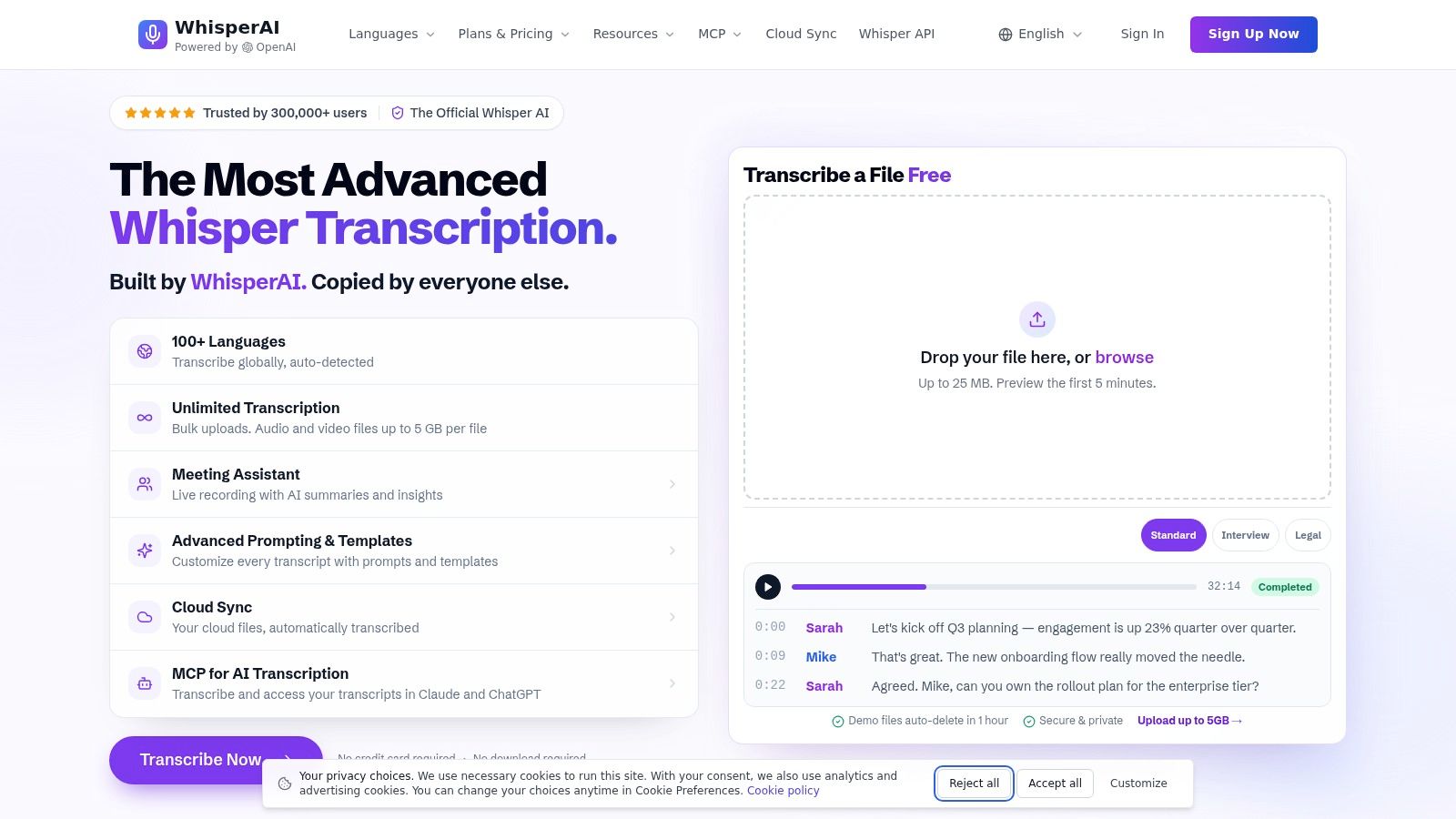
The practical takeaway here is that one platform can cover both sides of the workflow: a browser interface for quick, immediate work and APIs for automation inside your own software.
Choose a Practical Starting Point
WhisperAI also supports bulk uploads, reusable defaults, real-time transcription, and developer minutes for teams processing audio regularly. Its stated security approach includes encryption, GDPR-aligned handling, and deletion controls, though you should confirm current terms if you're working with sensitive recordings.
For a content team, the sensible test is straightforward:
- Upload one clean interview and one noisy group recording.
- Check names, terminology, timestamps, and speaker labels.
- Export captions and a document.
- Compare editing time against your current process.
Once you have a corrected transcript, you can feed it into a repurposing workflow. For ideas on stretching one recording into lasting content, read this guide on turning webinars into evergreen posts.
A polished demo proves very little. Before committing to a speech-to-text API, you need recordings that actually mirror your real-world conditions — the microphones you use, the accents your team speaks with, the interruptions, background noise, languages, and specialist terminology that show up day to day.
Earlier comparisons show exactly why vendor claims deserve scrutiny. One evaluation reported average accuracy of nearly 0.978 for Google Cloud Speech API, 0.945 for Bing Speech API, and 0.881 for IBM Watson Speech to Text. It also recorded 487, 376, and 186 correctly recognized sentences out of 600 respectively. Meanwhile, North America accounted for roughly 32.27% of the global market in 2025, which tells you this is a mature category with no shortage of options. Read the full research about speech recognition provider findings.
Compare Real Costs
Pricing generally breaks down into two models:
- Per-minute billing works well for sporadic or unpredictable workloads, but every upload, retry, and re-recording adds up fast.
- Subscription pricing gives you predictable budgeting, though you'll want to watch for usage caps, seat limits, storage fees, and overage charges.
Work out your monthly minutes, average file length, whether you need streaming, diarization, translation, storage, and exports. Then dig into the fine print — rounding rules, minimum charges, premium model tiers, and paid add-ons can all shift the real cost significantly. For another angle on comparing automation expenses, take a look at this guide to automation platform cost comparisons.
The cheapest per-minute transcription rate rarely equals the lowest total operating cost. Factor in editing time, failed jobs, storage, integration effort, and those unexpected overages that always seem to appear.
Run a Controlled Pilot
Don't sign a long-term contract after testing one clean studio recording. Build a small evaluation set that covers a podcast, a noisy interview, a group discussion, a technical explanation, and a short live stream.
- Send identical files to two or three providers.
- Compare word error rate, proper names, numbers, domain terminology, timestamps, and speaker labels.
- Record processing time, latency, failure rates, and how many minutes your editors spend correcting output.
- Estimate the full monthly invoice using your realistic volume.
- Ask your team whether the output actually fits their publishing workflow.
Ask Privacy Questions
Voice recordings often contain customer details, confidential strategy, or personal information. Confirm encryption in transit and at rest, retention periods, deletion controls, regional processing, access logs, compliance certifications, and subprocessors.
The big one: ask whether recordings or transcripts are used to train public models. Get contractual clarity on ownership, storage, and human access. If your team handles regulated information, loop in legal and security reviewers before anything goes to production.
A sensible next step is a two-week pilot with clear success thresholds for accuracy, latency, cost, and privacy. Pick the provider that hits those thresholds on your actual audio, then connect approved transcripts to Quuu for editing, post creation, scheduling, and publishing across your social profiles.
Can It Handle Accents and Dialects?
Broad language support is a starting point, not a guarantee. Real-world performance shifts depending on the specific dialect, microphone quality, and background noise in your recordings. Always test with audio from your actual speakers rather than trusting a headline number. Google Cloud lists over 125 languages and dialects, but accuracy can vary significantly between them.
A provider that nails a studio voice might stumble on your customer calls, regional accents, or overlapping speakers.
What About Technical Jargon?
When your recordings include product names, acronyms, medical terms, or industry-specific language, lean on custom vocabulary, phrase weighting, or file-level instructions. Then evaluate entity errors separately from overall word error rate. Fixing one brand name across a transcript can eat up more editing time than a handful of ordinary mistakes.
A practical test should cover:
- Names, prices, dates, and abbreviations
- Product terms that get misspelled regularly
- Fast speech and interruptions
- Your typical microphone and room setup
Should You Use Streaming or Batch Processing?
Pick streaming when captions, voice assistants, or live meeting text need to appear as someone speaks. Go with batch processing for podcasts, interviews, webinars, and archived recordings where a complete transcript matters more than instant output.
For either mode, track latency, failure rates, timestamps, speaker labels, and correction time. Most APIs return structured JSON, which makes it straightforward to push approved transcripts into tools like Quuu for social post creation and scheduling.
Before going live, run a small pilot with representative audio, confirm retention and deletion policies, and map out total pricing—including diarization or premium features. Deepgram recommends holdout testing with real recordings. Once a provider clears your quality, privacy, and budget bars, automate one workflow first, then expand from there.