10 Best AI Video Editors for Every Workflow
Compare 10 AI video editors for social clips, long-form video, subtitles, repurposing, pricing, exports, and practical workflows in 2026.
The worst advice about an ai video editor is to pick one “best” tool and force every workflow through it. The better question is simpler, what job does the editor need to do, and how much control do you still need after the AI has done the first pass? For a social team, that could mean rapid clipping, captions, and vertical reframing. For a podcast producer, it could mean transcript-led rough cuts. For a brand team, it might be generative drafts, collaboration, or professional finishing with color and audio control.
That's why this roundup compares 10 tools by the job they perform, not by feature-page hype. Some are built for short-form volume, some for long-form repurposing, some for text-to-video generation, and some for final polish. The market is moving quickly, too, from a niche category to a fast-scaling software segment, with independent estimates projecting major growth over the next decade in the AI video editing category and in broader AI-assisted production.
The practical filter is your own pipeline. Start with source material, output channels, volume, how much control you need, and whether you can live with credit-based billing or prefer a more predictable plan. If your social workflow also includes distribution, a clean path is to edit and repurpose video first, then move the copy, scheduling, review, and approval layer into Quuu so the publishing side doesn't become a separate manual project.
Table of Contents
- 1. Revid.ai
- 2. Descript
- 3. CapCut
- 4. VEED
- 5. Kapwing
- 6. Microsoft Clipchamp
- 7. Runway
- 8. Adobe Premiere Pro
- 9. DaVinci Resolve Studio
- 10. InVideo AI
- Top 11 AI Video Editors Comparison
- Choose the Editor That Matches Your Publishing System
1. Revid.ai
Revid.ai fits best when the job is turning ideas or existing links into social-first video quickly. It suits creators who want to move from a blog post, a subreddit thread, or a social account to a publishable clip without living in a traditional timeline. The workflow is built for viral-first output on TikTok, Instagram, and YouTube, which makes it more useful for distribution-led teams than for editors who need exact frame-level control. Revid.ai sits squarely in that category.
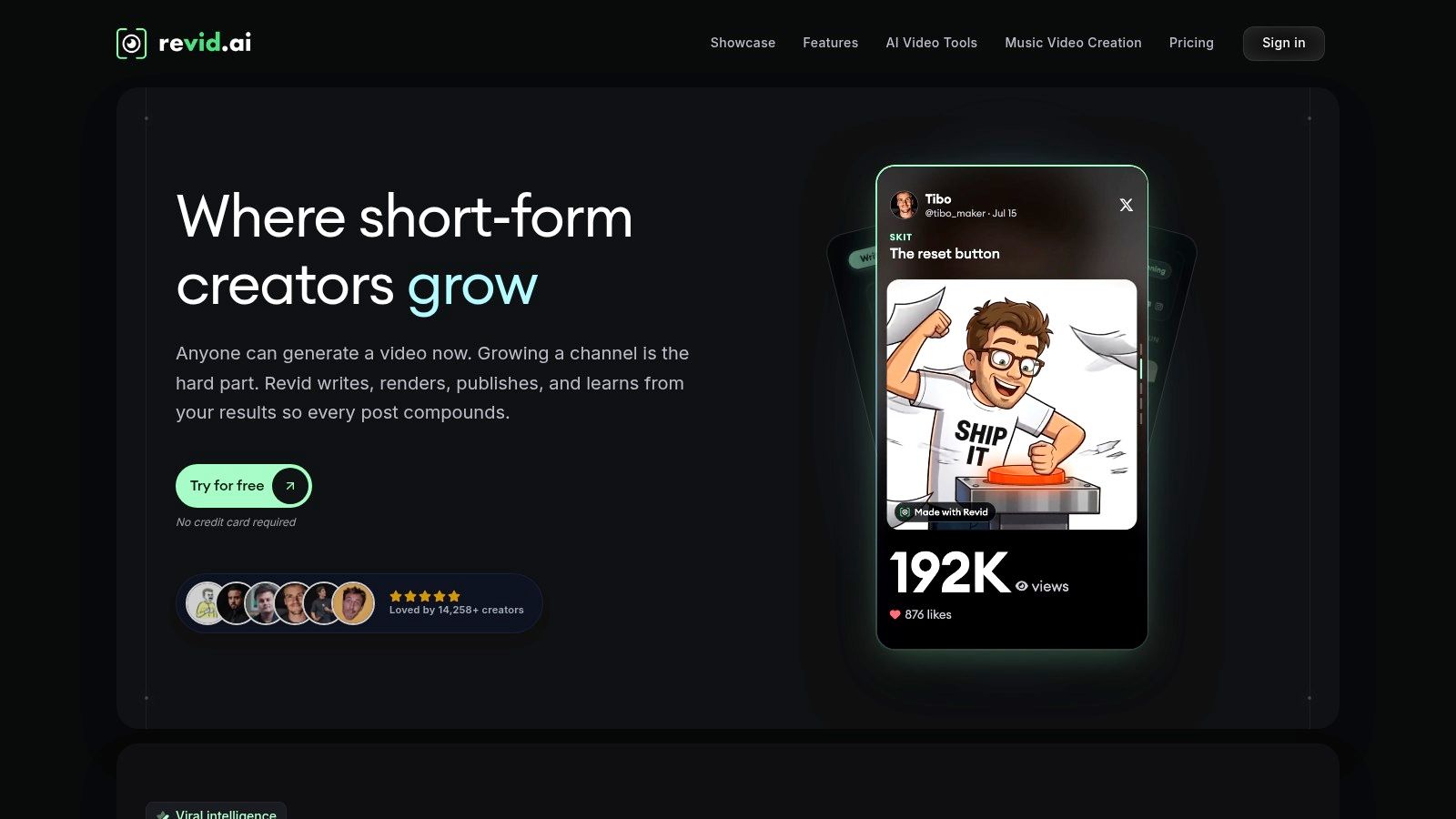
The main strength is the shorter path from source discovery to scripting and export. That matters if your team is repurposing trending content, testing hooks, or building a high-volume short-form queue. The built-in search and script generation features help you decide what to make before you spend much time editing, so the editor handles both content selection and packaging. That is a practical fit for teams that need speed without losing the creative direction.
Practical rule: use Revid.ai when the first problem is “what clip should we make?” not “how do we fine-tune a complex edit?”
For solo creators and lean marketing teams, Revid.ai works well as an AI video editor for scroll-stopping social output. The trade-off is control. It is less useful if you need detailed timeline work, advanced finishing, or a collaboration layer built around larger creative approvals. Pricing and usage limits can also matter once several people start pushing a lot of clips through it, so the plan has to match the volume you expect. For Quuu distribution, it works best upstream, the video gets created and approved elsewhere, then Quuu handles the written post, scheduling, and publishing around that asset.
2. Descript
Descript is one of the clearest answers if your team thinks in transcripts rather than timelines. It turns editing into a document workflow, which is why it works so well for podcasts, webinars, interviews, and course content that needs to be cut into smaller pieces. The main appeal is that rough cutting becomes much faster, since you can remove filler words, trim sections, and shape a narrative by editing text instead of dragging clips manually.
Why transcript-led editing works
The platform's Underlord co-editor and its assistive tools, like Studio Sound, Eye Contact, green screen, captioning, and translation, make it easier to turn one long recording into multiple outputs. That's especially useful when the same recording needs a full-length master, short social clips, and a version with cleaner audio. In real workflows, that means fewer app switches and less time rebuilding the same content in different places.
Descript is especially good when the original material already has a clear speaking structure. If the source is an interview or webinar, the transcript often becomes the fastest path to a publishable first cut. If the footage is heavily visual or performance-driven, the value drops a bit because the transcript is only part of the story.
Watch the plan limits
The main trade-off is operational. AI credits and media-hour limits mean the team has to keep an eye on usage, especially if multiple editors are repurposing large files every week. Browser-based collaboration is convenient, but large projects can be more demanding on bandwidth than teams expect. Still, for transcript-first teams that want a fast rough cut and easy social repurposing, Descript remains one of the most practical editors on the market.
3. CapCut
CapCut is the social-first option that feels closest to the day-to-day reality of short-form publishing. It works across web, desktop, and mobile, which matters because a lot of short-video work happens away from a desktop NLE. If the job is to produce TikToks, Reels, or Shorts quickly, CapCut's blend of templates, captions, dubbing, and cloud assets makes the workflow feel immediate instead of overbuilt.
Why it works for social volume
The main draw is speed. Auto-captions, translation, dubbing, and prompt-led edits reduce the amount of manual cleanup needed for a clip that's already close to ready. For teams that publish often, templates do a lot of the heavy lifting, especially when brand consistency matters more than custom motion design. CapCut's cross-device setup also makes it easier to start on mobile and finish on desktop, or the other way around, without rebuilding the project.
For social teams, that flexibility pairs well with a scheduling process. A useful internal reference is this guide to scheduling short-form videos efficiently, because the primary bottleneck usually isn't editing alone, it's getting clips ready to ship at the right cadence.
Where it can get messy
The downside is plan clarity. Pricing varies by platform and region, and the distinctions between Standard, Pro, and Teams can be confusing. That matters once a team starts relying on premium templates, cloud storage, or collaboration. CapCut is strongest when you want fast, repeatable output rather than deep post-production nuance. If your publishing system is built around speed, light iteration, and mobile-first creation, it's a very strong fit.
4. VEED
VEED is a browser-based editor that makes sense when collaboration and quick social turnaround matter more than local desktop power. It's built around AI generation and editing in the browser, which means teams can move from script to clip without setting up a heavier production environment. That can be a real advantage for marketing teams that need to share drafts internally and produce a lot of short, branded content.
What stands out in practice
The platform's subtitle, translation, and dubbing tools are the most immediately useful for repurposing. If your output needs multilingual reach or platform-native captions, VEED removes a few of the small tasks that usually slow teams down. The Gen-AI Studio and script-to-video tools add another layer, especially for teams that need a first draft before manual refinement.
Brand kits and templates also help when multiple people are producing content, because the visual guardrails are already inside the editor. That makes VEED more useful for collaborative, social-friendly output than for meticulous finishing. It also keeps the work in one place, which is easier on smaller teams that don't want a separate motion or post-production stack.
The trade-offs
The main friction is pricing complexity. Credit bundles and plan differences can be hard to forecast, especially if several people are generating assets and editing iteratively. Some features sit behind separate AI-credit structures, so it's worth checking actual usage patterns before you commit. VEED is a solid choice if you want all-in-browser production, collaboration, and fast export paths, but it stops being the right fit when your workflow needs deep timeline work or studio-style finishing.
5. Kapwing
Kapwing feels built for teams that repurpose content constantly and need a browser editor that can handle both AI assistance and collaborative review. It combines a broad toolset with multiple AI models, which makes it useful for agencies, content teams, and anyone managing a lot of asset variations. If the job is clipping, subtitling, dubbing, translating, resizing, and moving fast across channels, Kapwing is in a very practical middle ground.
Why teams pick it
The appeal is that a lot of repurposing work lives in one place. You can resize clips, add captions, generate translations, and keep brand elements in the same collaborative workspace. That makes it easier to hand off work without losing context. In multi-person teams, that matters as much as the actual AI features, because approvals and versioning usually slow down production more than the edit itself.
Kapwing also tends to make plan differences clearer than some other browser tools, which helps when teams need to forecast usage. The platform's collaboration and permissions setup is another plus if you're managing multiple contributors or client stakeholders.
Practical rule: use Kapwing when the team needs one shared browser workspace for repurposing, not a chain of disconnected tools.
What to watch
Heavy AI usage consumes credits, so the cheapest-looking plan can become tight once the team starts generating, translating, and iterating at scale. If your workflow is mostly high-volume social content and you want collaborative editing without moving into a full pro NLE, Kapwing is strong. If you need highly polished finishing or complex effects, it's better as a repurposing layer than as the final stop.
6. Microsoft Clipchamp
Clipchamp is the least intimidating option on this list, and that's part of its appeal. It fits teams that want a simple AI-assisted editor already tied into the Microsoft ecosystem. For internal videos, quick social cuts, and low-friction publishing, it lowers the barrier enough that non-editors can finish a project instead of passing it around forever.
Why it works for everyday teams
Auto compose, highlight detection, text-to-speech, and template-driven editing give Clipchamp a good balance of simplicity and speed. If a team already uses Microsoft 365, the biggest advantage may be that there's no separate production culture to build. People can create, edit, and export without learning a dense pro application first.
The social presets also help when the deliverable is straightforward. That's where Clipchamp earns its keep, on videos that need to get made and shipped without a long learning curve. It's especially useful for teams that care more about communication velocity than about high-end visual effects.
Where it stops
Clipchamp isn't trying to replace a professional finishing suite. It's weaker on complex timelines and advanced effects, and some features vary between account types. That means it's best for teams that want a dependable, low-friction editor inside a familiar software stack. If your publishing system needs speed, access, and basic AI help more than full creative control, Clipchamp is easy to live with.
7. Runway
Runway is best suited for creative exploration, concept development, generative B-roll, and stylized motion, especially when the job calls for visual ideas that do not exist yet. It handles object removal, relighting, inpainting, background work, and other model-driven edits that would normally sit deeper in a post pipeline. For agencies, brand teams, and creators building motion-first assets, that changes the editing job from cleanup to creation.
Where it shines
Runway is strongest when a team needs to build options quickly. You can turn rough concepts into visual variations, reshape footage for a campaign direction, or generate B-roll that would otherwise take more production time than the asset justifies. The timeline editor keeps the workflow grounded, but the main advantage is how fast it produces material worth reviewing.
For a broader look at the AI video editor market, this Quuu roundup of AI video tools helps place Runway in context. It belongs in a workflow where creative testing matters more than strict clip assembly.
Credit-based usage and the learning curve
The trade-off is usage cost. Credit-based pricing can make iteration expensive, so teams need to watch how often they generate and revise. That matters most when a campaign asks for many variants or frequent experimentation.
The learning curve is also real. Strong results usually come from people who know how to prompt, refine, and work within a model-based system. Runway fits teams that want visual novelty and fast production of concepts. It stops making sense when the job is simple fixed-cost clip editing or when the team needs predictable export planning more than creative range.
8. Adobe Premiere Pro
Premiere Pro is still the safest answer when the work needs to stay inside a professional editing ecosystem. Its AI features matter, but the bigger story is that it keeps the edit in a tool that already fits broadcast, agency, and brand workflows. If you need a handoff to After Effects, Photoshop, or the wider Adobe stack, the path is obvious, which makes it easier to keep complex projects moving.
Why professionals keep using it
Generative Extend is the most practical AI addition for a lot of teams because it can patch short video or audio gaps without forcing a restart. That kind of fix is especially valuable when deadlines are tight and the edit almost works but not quite. Media intelligence and translation tools also help with faster locating and repurposing inside larger libraries.
Premiere Pro also has a reputation advantage. When a brand wants control, auditability, and familiar professional workflow conventions, it's hard to replace. Content Credentials support on export is another useful layer for teams that care about authenticity and handoff integrity.
The downside
The learning curve is heavier than browser tools, and some AI features may require understanding generative credits or beta behavior. That makes Premiere Pro a better choice for production teams than for casual social publishers. If your workflow includes agency handoffs, complex timelines, or final brand finishing, it's still a strong default.
9. DaVinci Resolve Studio
DaVinci Resolve Studio is the best fit when the job is professional finishing. It combines editing, color, audio, and VFX in one place, which is why it remains a serious choice for brand video and post-production teams. The AI Neural Engine adds practical tools like Magic Mask, text-based editing, Smart Reframe, and voice isolation, but the bigger strength is the overall finishing system.
Why it stands apart
Resolve is especially valuable when color and sound matter as much as the edit itself. That's where many social-first tools fall down, they get you to a usable clip, but they don't finish it at a level that survives scrutiny. Resolve Studio is built for that last mile. It's also useful for collaborative cloud workflows, which helps when projects move across multiple editors or departments.
The licensing model is another reason teams like it. A one-time Studio license can be easier to justify than recurring subscriptions, especially for post teams that use the software heavily.
What you're signing up for
The learning curve is real, and many AI features sit in the paid Studio version. Hardware matters, too, because advanced tools need a capable machine. Resolve is not the easiest editor on this list, but it's one of the most complete when your output has to look and sound finished, not just assembled.
10. InVideo AI
InVideo AI is built for fast prompt-to-draft production. It works well when marketing teams need a usable video quickly from a script, blog post, or plain prompt. The timeline editor, templates, and stock library make the result feel assembled, which helps when the main job is to get to a publishable draft without starting from scratch.
Why it fits marketing workflows
The strongest use case is speed with structure. InVideo AI suits teams that want to move from idea to draft without building every scene by hand. That makes it practical for explainers, promotional videos, and social assets where the first version mainly needs to be ready for review. Current plans start at $20/month for 25 minutes of AI-generated video, and higher tiers add more generations and team seats.
The constraint
The trade-off is credit consumption. Iteration costs matter, and regenerate cycles can add up quickly if the team keeps changing direction. That makes InVideo AI a better fit for teams with a clear brief and a tighter publishing workflow, including Quuu distribution, where the goal is to produce and ship a draft efficiently. InVideo AI excels at producing publishable drafts quickly from a clear brief, but it is less suited for teams that iterate constantly or need open-ended creative exploration.
Top 11 AI Video Editors Comparison
| Tool | Core focus / Key features | Best for | Unique selling point | Pricing note |
|---|---|---|---|---|
| revid.ai | AI-driven script & clip generation from ideas or links; trending search; editor | Creators & marketers wanting viral-first short videos quickly | Automates turning existing content/links into social-ready videos | Subscription-based; free trial likely |
| Descript | Text-based video & podcast editing; AI co-editor, Studio Sound, captions, translations | Podcasters and creators repurposing long-form to social clips | Edit like a doc with strong audio and transcript-first workflow | Subscription with AI credits / media-hour limits |
| CapCut | Social-first editor across mobile/desktop/web; auto-captions, templates, dubbing | Short-form creators and mobile-first teams | Fast mobile workflow and extensive templates for reels/tiktoks | Free tier; Pro/Teams paid tiers (regional pricing varies) |
| VEED | Browser editor with Gen-AI Studio, subtitles, translation, dubbing, API | Teams needing quick in-browser generation and automation | Script-to-video generation + API for automated workflows | Subscription + optional AI-credit bundles |
| Kapwing | Collaborative online editor with 100+ tools and multiple AI models for repurposing | Teams and agencies producing social content at scale | Broad generative & repurposing toolkit in one browser UI | Subscription; higher tiers for heavier AI use |
| Microsoft Clipchamp | Simple editor with AI assists (auto compose, TTS, templates); MS 365 integration | Microsoft 365 users and internal comms / non-editors | Low-friction social videos with tight Windows/M365 integration | Included with some Microsoft 365 plans; free tier |
| Runway | AI-first generative suite: text/image/video generation, inpainting, relighting, upscaling | Creators needing advanced generative effects and concepting | Cutting-edge generative models & video apps for stylized content | Subscription + credit-based usage |
| Adobe Premiere Pro | Professional NLE with Firefly-powered AI features and media intelligence | Broadcast, agencies, and professional post-production | Deep ecosystem, pro tooling and Adobe handoff workflows | Adobe Creative Cloud subscription |
| DaVinci Resolve Studio | Full pro suite (Edit/Fusion/Fairlight/Color) with Neural Engine tools | High-end finishing, color grading and studios | Best-in-class color/audio and one-time Studio license option | Free version available; Studio is one-time paid license |
| InVideo AI | Script-to-video platform with templates, stock library and credits model | Marketers needing quick explainers, ads and social assets | Prompt-to-draft workflow with marketing templates and stock | Subscription + credits for generation |
| OpusClip | Automated repurposing of long-form to short clips with hook detection & virality scoring | Creators/teams scaling short-form repurposing from webinars/podcasts | Rapid high-volume repurposing with virality prioritization | Subscription with paid tiers for higher volume |
Choose the Editor That Matches Your Publishing System
There isn't one best ai video editor, there's only the best fit for the job in front of you. Transcript-led tools like Descript make the most sense for webinar and podcast repurposing. Social-first editors like CapCut, VEED, Kapwing, and Clipchamp are better when you need fast vertical output with lightweight collaboration. Generative platforms like Runway and InVideo AI work well when the team is making concepts, ad drafts, or stylized motion pieces. Premiere Pro and DaVinci Resolve Studio still win when finishing control, color, audio, and professional handoffs matter most.
The comparison table below is the fast way to narrow the shortlist.
A repeatable publishing workflow keeps all of this from turning into tool sprawl. Start by preparing the source video, then create a master edit, generate platform-specific clips and captions, review claims and branding, export the required formats, and adapt the copy and visuals for each network. After that, use Quuu to generate, format, schedule, review, approve, or publish the accompanying posts across X/Twitter, LinkedIn, Facebook, and Bluesky. Quuu doesn't replace the video editor, it handles the distribution and social workflow layer so the finished content gets shipped on time.
Before you commit to any plan, test one representative project from start to finish. Use a real source file, not a toy clip. Check how long it takes to edit, whether the export format matches your channel needs, how many credits or plan limits get consumed, and whether the review process feels smooth enough for the team to repeat. If the tool saves time on one real project and doesn't create cleanup work at the next stage, you've found the right fit.